

What is an ATS in recruitment?
An ATS (Applicant Tracking System) is software that stores incoming applications, extracts the text from resumes, splits it into sections and lets recruiters filter candidates by keyword. It ranks applications before a human reads them.
You send out applications and nothing comes back. No rejection, no acknowledgement: just silence. Before you start doubting your experience, there's one thing you need to know: at most large companies and on most job boards, software reads your resume before a human ever opens it. It's called an ATS, short for Applicant Tracking System.
This software doesn't judge your worth. It does something far more basic — which is exactly why you can prepare for it: it turns your file into plain text, looks for terms, and assigns a score. Here's what it actually sees, and why an excellent resume can fail at this stage.
What an ATS actually is
An ATS is application management software. It stores the resumes a company receives, sorts them, lets recruiters filter them and tracks each candidate through the hiring process. Recruiters use it because an attractive job posting can draw several hundred applications, and nobody reads three hundred resumes.
The common misconception is to picture an artificial intelligence assessing your profile. That's rarely the case. A typical ATS does text extraction and term matching. It checks whether the words in the job ad appear in your resume, where they appear and how often. The recruiter then filters on those criteria.
The consequence is counter-intuitive: at this stage, the substance of your resume matters less than how machine-readable it is and the vocabulary it uses. A perfect profile described with the wrong words doesn't rise to the top of the results.
The four stages of automated screening
Understanding the path your file takes helps you see where it breaks.
| Stage | What happens | What makes it fail |
|---|---|---|
| 1. Extraction | The file is converted to plain text | Columns, tables, text inside an image |
| 2. Parsing | The text is split into sections: experience, education, skills | Made-up or missing section headings |
| 3. Matching | The terms from the job ad are searched for in the text | Synonyms used instead of the exact terms |
| 4. Ranking | A score is assigned and the recruiter filters | A score too low to appear in the list |
Stage 1 produces the most unfair failures: a beautiful two-column resume can come out of extraction as a jumble where dates are separated from job titles. Everything after that works on incoherent text.
Six formatting mistakes that break parsing
None of these mistakes has anything to do with your experience. All of them are about how the file is built.
- Columns. A two-column layout reads beautifully to the eye and terribly in extraction: the text can be read line by line straight across both columns. One column, always.
- Headers and footers. Many parsers ignore them. If your email and phone number live there, you become unreachable.
- Text inside an image. A stylised heading exported as an image, a logo containing your name: invisible. Check by selecting the text in your PDF — if you can't highlight it, the machine can't read it.
- Tables. The same problem as columns, only worse when cells are merged.
- Creative section headings. “My journey” or “Where I grew” are charming, but parsers look for “Work experience”, “Education” and “Skills”. Stick to the standard headings.
- The file format. PDF is accepted almost everywhere, as long as it was exported from a word processor rather than scanned. A scanned PDF is an image: unreadable.
Finding the keywords in a job ad
A job ad contains twenty to forty terms that matter. They aren't highlighted, and they aren't necessarily the ones that seem important to you.
The manual method takes four steps:
- Copy the entire job ad into a document.
- Highlight every tool, method, software, certification and degree mentioned.
- Highlight the action verbs that repeat: “manage”, “deploy”, “analyse”.
- Note the exact job title. It's the most heavily weighted term, and the one candidates most often swap for a synonym.
Then check which ones already appear in your resume, and where. A term listed in your skills section carries less weight than the same term tied to a dated role: the first is a claim, the second is evidence.
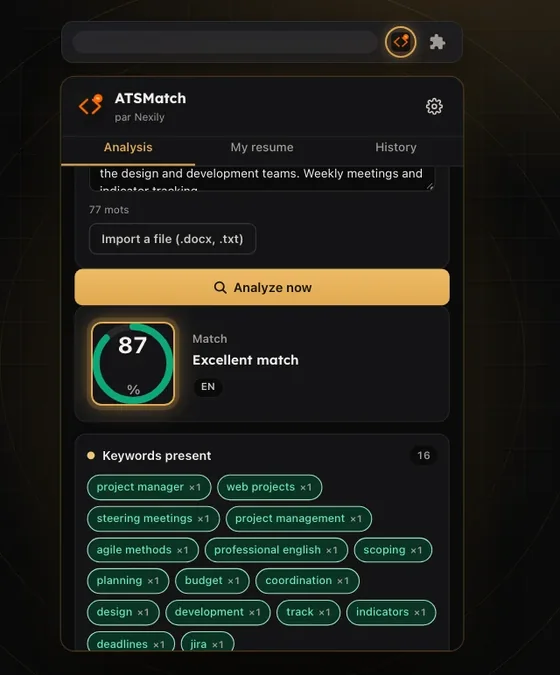
Done by hand, this takes around twenty minutes per job. It's exactly what Nexily ATSMatch automates: the extension analyses the job ad open in your browser and lists the missing terms, with their weight.
 Nexily ATSMatch
Compare your resume with the job ad before applying.
Discover ATSMatchFree: 3 analyses per day
Tailoring your resume in five minutes, not an evening
Rewriting a whole resume for every application is unsustainable, and unnecessary. Eight places are enough, and they're always the same:
- The job title at the top of your resume, matched to the one in the ad
- The two-line summary under your name
- The first three bullet points of your most recent role
- Your list of technical skills
- The tools mentioned in each role
- Certification names, written out in full and then abbreviated
- Your degree, in its official wording
- The file name, which is sometimes indexed
What you should never change: dates, company names and chronological order. Those are what the recruiter checks, and an inconsistency there costs far more than a missing keyword.
Writing for two readers at once
The trap of ATS optimisation is ending up with a resume that gets through the filter and puts off the human who reads it next. The two readers aren't looking for the same thing.
| The ATS looks for | The recruiter looks for | |
|---|---|---|
| Vocabulary | The exact terms from the ad | Natural, readable wording |
| Structure | Standard sections | A career path that makes sense in ten seconds |
| Detail | The presence of the terms | A measurable result |
| Layout | One column, no images | Something clean and easy to read |
The good news is that the two requirements overlap more than they conflict. A line like “Rolled out solution X across 12 branches, cutting turnaround time by 30%” contains the expected term, the measurable proof and reads well. That's the format to aim for everywhere.
Three common myths
“Every recruiter uses an ATS.” No. Small businesses, small agencies and many direct applications go straight to a human. Automated screening mostly applies to large organisations and job boards.
“Your resume needs zero formatting.” Also no. Bold text, bullet points, standard headings and a classic font parse perfectly well. Columns, tables and images are what cause trouble.
“The score decides everything.” The score ranks; it doesn't always eliminate. A recruiter who doesn't find enough candidates widens the criteria and scrolls further down the list. A good ranking improves your chances; a poor one doesn't mechanically rule you out.
Tracking your applications matters as much as what's in them: knowing who to follow up with, and when, happens after you hit send. That's the subject of our article on the job search routine that lasts three months.